In-Person Courses
To register for a webinar ELEVATE Training course, first navigate to https://www.monitoraudio.com/en/espa-courses/ and select the In-Person course you would like to attend.
NOTE: These will always be held at ELEVATE Sound Performance Academy rather than Online Webinar.

Once you have selected the course you wish to attend, this should direct you to a form to fill out for all attendees.
Webinars
To register for a webinar ELEVATE Training course, first navigate to https://www.monitoraudio.com/en/espa-courses/ and select the Online course you would like to attend.
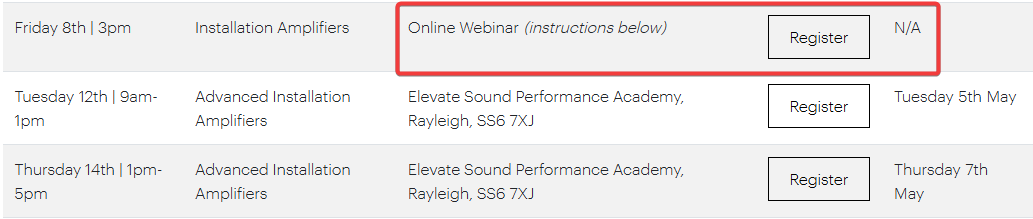
- Select 'Register' on the online webinar course above
- On the Elevate Training Portal, select 'Get this course'
- 'Sign up' or 'Login'
- Once signed in, select 'Start Course'
- Lastly, select 'Register'
Please watch our video below for step-by-step instructions;
If you were unable to find an answer to your query in our ELEVATE support section or you require any further assistance, please contact our ELEVATE Training team via email at training@monitoraudio.group or give us a call on +44 1268 740580.
Was this article helpful?
That’s Great!
Thank you for your feedback
Sorry! We couldn't be helpful
Thank you for your feedback
Feedback sent
We appreciate your effort and will try to fix the article